SKY HIGH
Introduction
This project was my submission for my Professional Diploma in UX design, therefore I worked unaccompanied and completed from November 2022 to March 2023.
The purpose behind this fictional project was to consider all issues identified in research to create a quick, easy and intuitive online booking experience for the client (an airline company) that deeply understands its users needs and meet the expectations.
My target users were those looking to book flights for both business and leisure and ensuring the website catered to both by including extras such as hotels, car transfers and holiday deals. My airline company was called “Sky High” and as a new brand, it was vital to gain customer loyalty and therefore, it was necessary for me to design an airline website which people would want to use again.
TOOLS
-
Miro
-
Figma
-
Microsoft Office
TEAM
-
1 UX designer
-
1 remote collaborator
ROLE
-
UX design
-
UX research
-
Workshop facilitator
THE PROCESS
RESEARCH
ANALYSIS
DESIGN
PROTOTYPE
WIREFRAME
RESEARCH
Competitive Benchmarking
For my research, I applied a triangulation approach to uncover different perspectives to cross examine information which factors should be prioritised and what issues need to be resolved.
Competitive benchmarking was one of the research analysis tools I used. I compared 4 airline websites; Qatar Airways, Emirates, Etihad Airways and British Airways.
The aim of this research tool was to identify:
-
conventions
-
best practice
-
pain points
-
users mental models
-
learning how best in class airline websites solve problems we are also trying to solve.


Surveys
An online survey was also completed to gather information on target audience expectations, to assist in future decision making for later design stages. The open-ended survey was completed on Survey Monkey and in only just a few days, there was a total of 15 submissions.
OUTCOMES:
-
52% search using desktop
-
76% completed the task desired
-
prefer better filtering options
-
82% of people found it more secure to book on direct website compared to aggregator website
-
Would like additional options in search bar
-
important factors for users: dates, price, direct flights
With these results, it was strongly presented as an opportunity for the airline website to implement user evaluations into modification. Taking in consideration of the above findings, I decided I would apply better filtering options in the search bar, as well as prioritise displaying dates, prices and alternatives flights for users to compare.
Usability Tests & Note Taking
In addition to watching two usability tests provided by the UX Design Institute, I also conducted a usability test to gather rich insights directly from users as they compared different websites whilst using them. Within the usability tests, I changed the scenarios and used different airline websites to test as I wanted to collect broad data.
Throughout the test, it was very important for the later stages of note taking that I was cautious on the information I was providing. This included screen states and actions and page selections user was taking which would impact on their feelings and actions as this would affect the accuracy and details of the results.
GOALS FOR REDESIGN:
-
Context framing: search bar to be easily accessible, simple to use, visible call to action buttons to prompt users.
-
Best practice: visibility of system status with progress indicators.
-
Digital affordances: users' selections should be obvious that they have been applied.
-
Confidence and forthcoming: user testing showed users expected the website to have populated their location considering they had used it previously multiple times. Options that cannot be selected were also shown to be an annoyance for users.

"That's confusing, I don't know if my fare has been selected".
“Erm...I'm not really sure where to start...”
“Why is it saying 'select your seats' when I can't?”
“I have used this website many times, it should already know what country and language applies to me”
ANALYSIS
Affinity Diagram
The tools used during the analysis for this project was an affinity diagram and then followed with a customer journey map.
I enjoyed this stage of analysis as I was able to work remotely alongside a colleague. I was able to learn the power of collaborative analysis using Miro software to arrange the chaos of notes into organized groups. We analysed and grouped the large set of data together and considered different stakeholder perspectives, suggestions, instructions and propositions, in order to get to the root of my findings.
Key priorities to consider that were frequently mentioned:
-
Calendar to highlight dates whilst being selected
-
Progress bar to highlight stages that have been completed – users were unsure what to expect when there was no progress bar
-
Providing all fare options with prices – users would prefer options to easily compare dates and were frustrated when unavailable fare options were presented.
-
Payment form to acknowledge data and option to scan card for payment

Customer Journey Map
From the results of the affinity diagram and the notes from the usability tests, I was successfully able to create a Customer Journey Map.
The map was able to reveal the outcomes and moods of the user throughout their experience during each of the steps within the process. The stages of the journey were; planning decision to travel, homepage, entering airport, dates of travel, passengers, selecting flights, dates and times, fare selection, extras, overview, payment and confirmation.
I was able to find that the user’s mental model was not always aligning with the design model of the websites which was creating negative behaviours, emotions and a lot of pain points.
The conclusive measurement of the user’s experience was formed through the analysis of the user’s emotions during each step of the process and through a summary of their overall experience.

User Flow
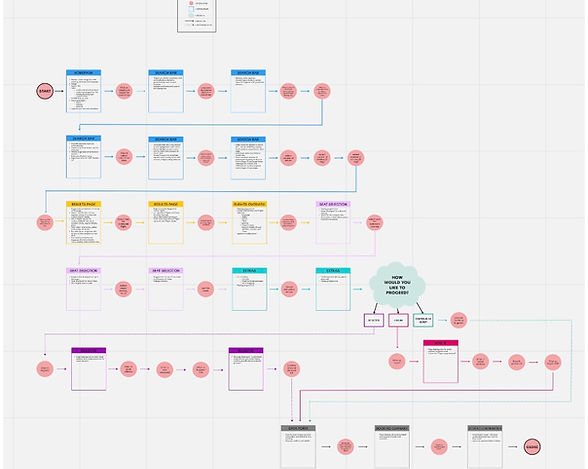
At this point, I had to go back to basics. It was important for me to understand exactly how a user would navigate through the website and booking process, in order for me to then envisage the site structure of where screens would be positioned and how and when the user would reach their desired point.
During this stage I was able to define which conventions and rules should be applied to allow the user to stay on the correct path of the booking process to reach and proceed with the final steps of payment.
Through the creation of the user flow, I implemented the happy path with the additional options to reveal any spin-off points to ensure developers had all the required information for the smooth and clean flow for the website to function well.
Once I was happy with the user flow, I then was happy to consider features and aesthetics.
DESIGN
Sketches
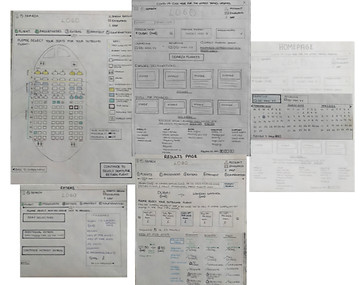
Following the formation of the flow diagram, I created medium fidelity sketches as a problem-solving tool to address issues identified from research in order to accelerate decision making through visualisation without losing time.
CONTEXT FRAMING: user testing showed confusion on how to begin a search, now a simple but visible search bar was created with prompting call to action buttons. The same format was applied throughout website to lower learning curve for user and saves time money during development.
PROGRESS INDICATORS: referring back to user testing, websites without progress indicators made users feel uncertain and unsure of what to expect within the process. Within my design, I applied progress indicators throughout the booking process to give users flexibility, freedom and control to modify search at any point.
PROACTIVE: competitor websites showed limitations of applying best practice, for example, displaying unavailable options resulting in user frustration time wasting as the system could have been forthcoming. I ensured to apply best practice by only presenting options which can be selected. I also ensured to display fare options and prices in aligned columns making it easier for users to compare prices as this was a raised recommendation.
POWER TO THE USER: an alteration which I applied within my designs was to implement a happy path flow for users to have the control and flexibility to personalize and cater to their chosen options. For example, options were presented for users to select seats, additional packages or to skip to payment, this would save time for users as they were presented with the most necessary and appropriate.
Throughout the entire design process, I ensure to refer back to the sketches to make sure primary goals and ideas were applied.
EVALUATIVE TESTING
The prototype tested well with 2 users.
Key improvements:
-
New flow was easy and clear to use: “It looks clear to me what I need to do and how to make these steps as there are obvious buttons”.
-
Users know what to expect: “I like that I can see my progress and I know what step is coming next”.
-
Users enjoyed having control; “I really like that I have options to skip straight to payment or choose any extras or select my seats. But it's nice knowing I have control over what I want to do rather than being told”.
Key takeaways:
-
Flow in search bar could be improved: “the passenger selection assumes how many passengers are going”
-
User requests reviews: “I think it would be good for users to leave some reviews, I like to leave reviews”.
SUMMARY
Overall, within this project I was able to create and design a well flowing booking process. I learnt to be flexible and to understand that some solutions may not go as anticipated and to accept any obstacles that occur within the process as these are learning curves when creating user-centered problems.
In addition, the project was an overall success as I identified significations problems and offered valuable answers.
In the future I would like to recreate the airline website to do more than just a happy path in order to validate any design assumptions.